
A familiar scenario: a manager needs the signed version of an old agreement. Someone thinks it is on the shared drive. Someone else remembers moving the folder into Teams. A third person has a copy saved in OneDrive, but nobody is sure whether it is the final version.
This is a familiar problem in organisations that have grown, merged teams, changed systems or simply been busy delivering services. Files accumulate because keeping them feels safer than making a decision about them. Eventually, the organisation has plenty of information but struggles to say what it holds, who owns it or which version to trust.
In brief
An untidy information estate can become a business risk as well as a daily source of wasted time. The first step is not a mass deletion exercise or another software purchase. It is to understand where important information sits, what it contains, who can access it and what should happen to it next.
The problem is bigger than the shared drive
A traditional network drive is an obvious place to look. But the same issues can develop in SharePoint document libraries, folders accessed through Microsoft Teams, individual OneDrive accounts, Google Drive, archived project spaces and older document-management systems.
There is a complication with Microsoft 365: what people think of as “Teams files” often lives in SharePoint behind the scenes. Standard Teams channels use the team’s SharePoint site, while private and shared channels can have their own sites. Microsoft explains how these spaces are connected. A review that looks only at the obvious folder structure can miss parts of the picture.
This collection of documents, messages and files is often called unstructured information: valuable material that does not sit neatly in a database. None of these platforms is inherently the problem. They are useful tools. The difficulty arises when new spaces are created, old ones are left behind, and nobody has a clear view across them.
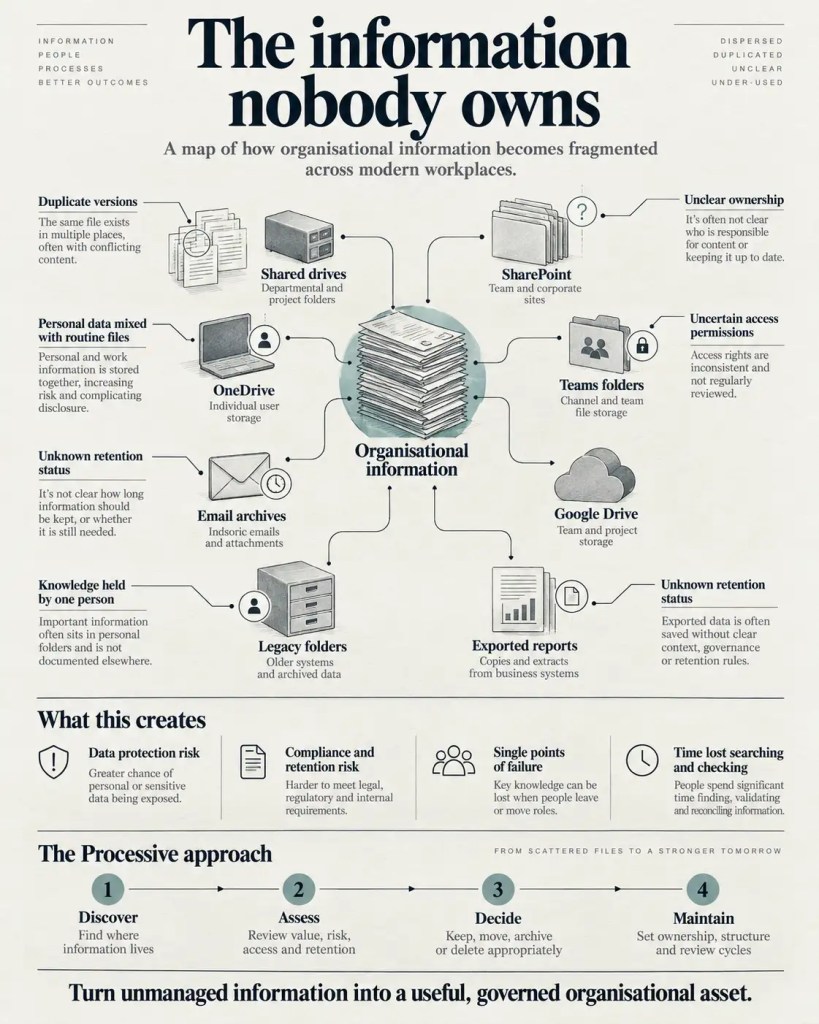
What can go wrong when nobody has the full picture?
1. You may be retaining information you no longer need
Old folders can contain more than project notes: former staff records, customer details, case information, contracts or supporting evidence from work that ended years ago. An old file is not automatically unlawful to retain. Some records have long retention periods, and others may need to be preserved for legal, operational or historical reasons.
But where personal information is involved, the organisation should be able to explain why it is still needed. The Information Commissioner’s Office guidance on storage limitation expects organisations to justify retention, review information and erase or anonymise personal data when it is no longer required.
That becomes difficult if nobody knows what is in the folders in the first place.
2. Access may be wider than intended
Permissions change as people join projects, move roles or leave. Sharing links are created for a good reason and sometimes remain in place long after that reason has passed. Sensitive documents may also be mixed with routine working files.
A messy repository does not necessarily mean that access is insecure. But it makes assurance harder: you need to know who can see which information, whether that access is still appropriate and what might be exposed if an account is compromised. The ICO’s security guidance specifically addresses documenting, limiting and checking access rights.
3. Essential knowledge can belong to one person
Ask who could find the right contract, policy or historic decision if the person who created the folder was away for a month. If the answer is “probably no one”, the organisation has a continuity problem.
A filename rarely explains why a decision was made, whether a document was superseded or how two sets of records relate. That context may exist only in a colleague’s head. When they leave, it can go with them.
4. People waste time checking information they should be able to use
Searching is only the beginning. Staff open several versions, compare dates, ask colleagues which document is current and rebuild reports from information scattered across teams. Some of that checking is necessary. Much of it is a sign that the information has not been managed as a shared organisational resource.
The consequences are often most visible during an audit, an information request, a service handover or a senior management meeting. Suddenly the organisation needs a reliable answer, not just another file.
How did it get into this state?
Usually, gradually. A department sets up a useful folder structure. A project creates another one. Teams introduces a more convenient place to collaborate. A reorganisation changes who owns the work. The old structure is kept because nobody wants to lose anything. New staff copy what they need into a space they understand.
Over time, information can become duplicated, out of date or detached from the work it was created to support. And because each individual decision made sense at the time, no single event looks like the cause.
The UK government’s August 2026 guidance calls this accumulation of documents, emails and collaboration content the “digital heap”. Its advice is to distinguish material with continuing value from redundant content, rather than treat the entire collection as either useful or disposable.
Where should an organisation start?
You do not need to catalogue every document across the business before making progress. A sensible review starts with a defined area: perhaps a large departmental SharePoint site, an inherited network drive or a collection of old project folders that frequently causes difficulty.
- Choose a meaningful starting point. Pick an area where staff struggle to find information, where access is uncertain or where the content may be sensitive. Agree who owns the review.
- Map the locations. Identify the drives, sites, Teams channels and other repositories involved. Record the size, broad content types, age and current owners before opening individual sensitive records.
- Review access and retention. Work with the organisation’s IT, information governance and records leads to identify permissions, applicable retention rules and anything requiring special handling.
- Decide what should happen to the information. Separate material needed for day-to-day work from records that belong in a managed archive, items requiring further assessment and content approved for disposal.
- Make the better arrangement stick. Give the information a useful structure, clear ownership, sensible access rules and a schedule for review. Address how new documents will be managed, not just the historical backlog.
A caution about deleting old files
Do not use file age or a duplicate-detection tool as the sole basis for bulk deletion. Retention obligations, ongoing cases, legal holds, audit requirements and records of historical value can all change what must be kept. Disposal decisions need authorised owners, appropriate review and a record of what was done.
The opportunity is more than tidier folders
Once information is understood and managed, the gains go beyond finding documents more quickly. Teams can work from an agreed version of a record. Managers can see what evidence exists and what is missing. Handover becomes less dependent on one person knowing the history. Sensitive material can receive attention appropriate to its importance.
There is also a longer-term opportunity. Reliable documents, clear ownership and agreed definitions can become useful context for reporting, automation and AI assistants. But putting disorganised files into an AI tool does not make them trustworthy. Access permissions, accuracy and the reason the information may be used still matter.
The aim is not to make every document perfectly organised. It is to make the information the organisation relies on easier to find, safer to manage and more useful in the work people do.
Five questions worth asking this week
- Can we identify our main information stores, including old sites and folders that are no longer actively used?
- Do we know which areas are likely to contain personal, confidential or business-critical information?
- Could we explain who has access to that information and why?
- Do the people responsible know what must be retained, reviewed, archived or disposed of?
- If a key colleague left tomorrow, could someone else reliably find and interpret the records needed to keep the service running?
If you cannot answer some of these, it does not prove there has been a breach or that the organisation is non-compliant. It tells you where a proportionate review could be worthwhile.
How Processive can help
Processive works with organisations to make fragmented information and the processes around it easier to understand and manage. We start by looking at where information is held, how it is used, where responsibilities sit and which problems matter most to the people running the service.
From there, we can help organisations improve structure and data quality, clarify ownership and introduce appropriate workflows or automation. Where ongoing support is useful, the work should include how information will remain current, accessible to the right people and subject to review. Existing platforms come first when they can meet the need.
For some organisations, the right first step will be a small review of one troublesome repository. For others, the priority may be a compliance evidence process or an area of operational reporting. Either way, the scope should be driven by the problem, not the quantity of files.
Not sure what is sitting in your information estate?
You do not need to commission a major clean-up to start understanding the issue. Bring us one shared drive, SharePoint area or information process that concerns you. We can discuss what a sensible first review could involve and whether Processive is the right fit.
Arrange an initial conversation